
This article explains how to upgrade or change your account subscription. This in-app functionality is only available to those with administrative privileges for their company account and for those not already on an Enterprise account.
To upgrade your service plan, click on the Settings button
 in the sidebar or
  in the top menu bar.
Click on the Subscription tab.

You will be able to view the different packages and subscription levels.
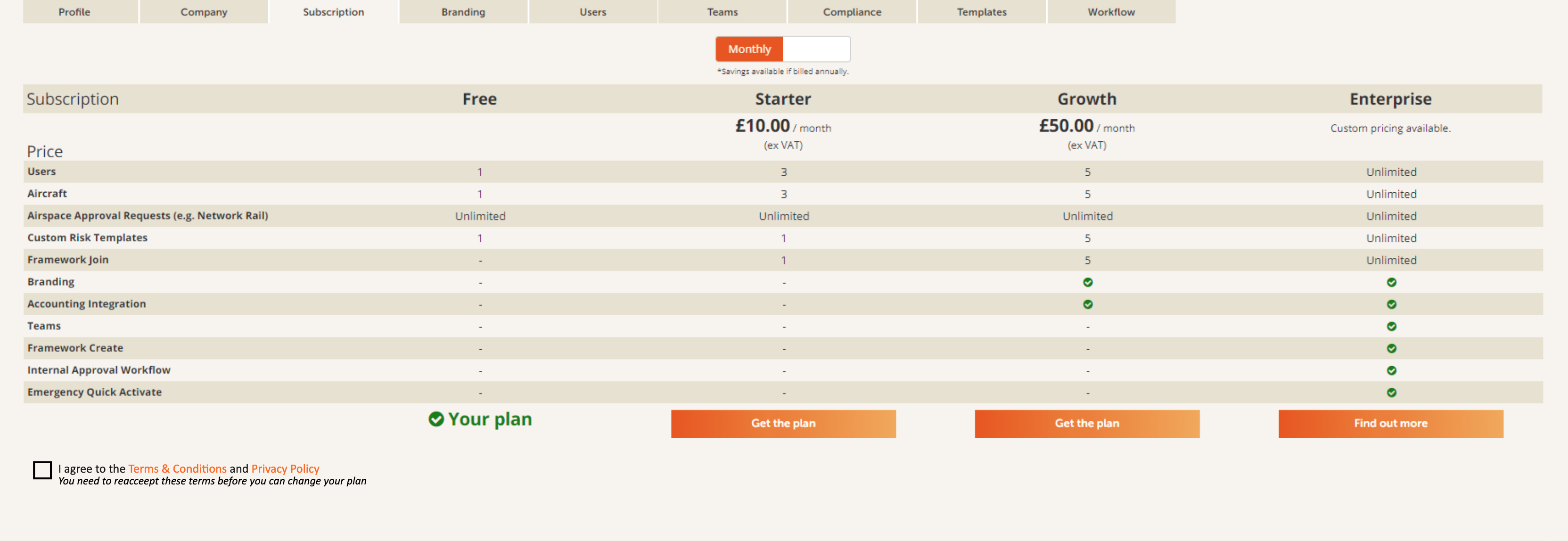
To upgrade to Starter or Growth packages, you will need to review our standard Terms & Conditions and Privacy Policy and check the box to agree to them before proceeding further because these form part of the contract.
Choose whether to pay monthly or annually with the slider at the top. Paying monthly, the initial term is one month; paying annually, the initial term is one year. For annual payments there is a discount applied.
Click on Get the plan button or Find out more button (in the case of Enterprise) below your chosen package.
Clicking on Get the plan for Starter or Growth packages will take you through to the payments page.
If you would like to make other changes to your account, please contact us through our support page.
Comments
0 comments
Article is closed for comments.