
Operation assignment allows an operation to be created by one person (Creator) and assigned to someone else to carry out (Owner). This article is for company administrators and explains how to set up a user to be able to create operations and assign them to someone else. For more details about assignment and how to assign a operation(once this feature is already set up for a user) please refer to support article: Assignment.
The Assignment feature is only available for the Enterprise subscription level, and the below steps can only be done by a user with Organisation Admin or Organisation Owner status.
To set a user up to be able to create and assign operations to other users, navigate to the Users page in Settings.
Click on the user you would like to set up to be able to assign operations to others. This will pop up a Details page from the right side.
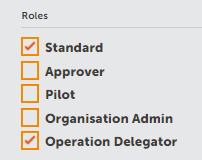
Scroll down to the bottom of the Details page to the Roles section.
Click on the checkbox Delegator so that it is ticked, and then click Update Detail to save and close the Details page.
Comments
0 comments
Article is closed for comments.